

؟Cisco SD-WAN ماهي تقنية
March 13, 2023
In this Post, I am going to demonstrate Segment-Routing SID types. This will be considered part 1 which discuss in details IGP global and local SIDs. The next part (part 2) discuss BGP Global and Local SIDs. But let’s get some general information about SR SIDs. There are two categories for SR SIDs as following:
Global SID: advertised to all nodes across domains (levels/Areas), and all nodes install it in forwarding table (FIB)
Local SID: advertised to all nodes resided in same domain. however only originator node installs it in forwarding table (FIB)
Local SID Confusion
i created below mind-map to represent all SID types that are associated to IGP and BGP. this mind-map will be the reference for SR SID types posts series.

1. IGP Prefix SIDs
let's start configuring these SIDs and inspect all flags come with. i will use below topology where ISIS protocol is used for underlay. ISIS Level 1 is highlight in Purple, while ISIS level 2 is highlighted in Red. R2,R12, R7 and R17 are L1/L2 routers. i run IPv4 and IPv6 AFIs multi-topology. i also enabled BGP VPNv4 and VPNv6 between PEs (R1,R11,R2,R12,R7,R17,R8 and R18) and RR routers (R9 and R10).
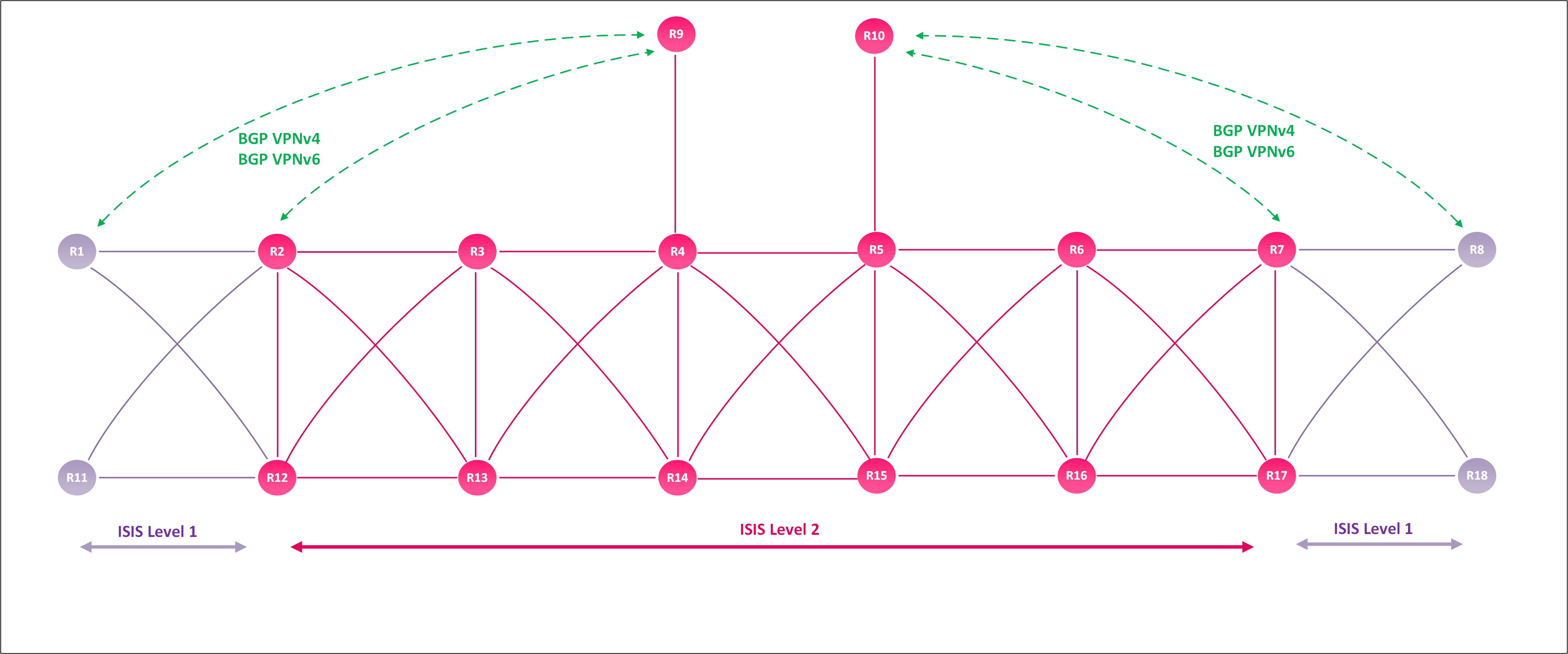
1.1. Node SID
Node SID is subset of Prefix-SID, Node SID set N-Flag when is configured. Node SID instructs data-plane forwarding to steer the traffic based on shortest path to prefix associated to that node SID with ECMP-aware. To enable Segment-Routing, first we need to specify Segment-Routing global Label (SRGB) Range size, by default the range will be 8000 labels starting from 16000 until 23999 and implicitly reserved in IOS-XR platform. In this scenario, we will use the default range.
|
XRV1
-------------
RP/0/RP0/CPU0:XRV1#show mpls label table detail | in SRGB (Lbl-blk SRGB, vers:0, (start_label=16000, size=8000) |
Next we need to choose Segment-Routing data-plane protocol (which could be either MPLS or IPv6) in our case we will enable SR-MPLS under ISIS IPv4/IPv6.
|
XRV1
-------------
router isis core
address-family ipv4 unicast segment-routing mpls sr-prefer ! address-family ipv6 unicast segment-routing mpls sr-prefer |
Next we need to configure the Prefix-SID under ISIS process under Loopback0 IPv4/IPv6 AFIs. Prefix-SID allocation formula as following:
|
IPv4 SID = 16000 + N (where N = Router Number) IPv6 SID = 17000 + N (where N = Router Number) |
Prefix-SID can be configured as Index value or absolute value. In case of Index value, Router will sum (SRGB Base label + Index value). for instance if Prefix-SID index value set to 1, then the final label will be 16000 + 1 = 16001. As per our formula IPv6 must have all labels started with 1700N. to get this value in index format, then we follow the same formula 16000 + 1001 = 17001. Node-SID configuration will be applied on all routers (N-SID will be unique in each router).
|
XRV1
-------------
router isis core
! interface Loopback0 address-family ipv4 unicast prefix-sid index 1 ! address-family ipv6 unicast prefix-sid index 1001 |
In IOS-XR, We can verify all routers loopback0 prefixes with assigned Node SID by using “show isis segment-routing label table” command. As per our formula all Node SIDs start with 1600N for IPv4 prefixes while 1700N for IPv6 prefixes. Bear in mind that ISIS advertise all prefixes SIDs across IGP levels/areas. XRv1 (resided in level 1) has learnt all routers’ prefixes SIDs which are located in ISIS level 2.
|
XRV1 RP/0/RP0/CPU0:XRV1#show
isis segment-routing label table IS-IS core IS Label
Table Label Prefix Interface ---------- ---------------- --------- 16001 10.1.1.1/32 Loopback0 16002 10.2.2.2/32 16003 10.3.3.3/32 16004 10.4.4.4/32 16005 10.5.5.5/32 16006 10.6.6.6/32 16007 10.7.7.7/32 16008 10.8.8.8/32 16009 10.9.9.9/32 16010 10.10.10.10/32 16011 10.11.11.11/32 16012 10.12.12.12/32 16013 10.13.13.13/32 16014 10.14.14.14/32 16015 10.15.15.15/32 16016 10.16.16.16/32 16017 10.17.17.17/32 16018 10.18.18.18/32 17001 10:1:1::1/128 Loopback0 17002 10:2:2::2/128 17003 10:3:3::3/128 17004 10:4:4::4/128 17005 10:5:5::5/128 17006 10:6:6::6/128 17007 10:7:7::7/128 17008 10:8:8::8/128 17009 10:9:9::9/128 17010 10:10:10::10/128 17011 10:11:11::11/128 17012 10:12:12::12/128 17013 10:13:13::13/128 17014 10:14:14::14/128 17015 10:15:15::15/128 17016 10:16:16::16/128 17017 10:17:17::17/128 17018 10:18:18::18/128 |
all SR information will be carried on ISIS database TLVs, we use "show isis database LSP-ID verbose" to check Prefix-SID along with attached flags. note that N-flag is enabled = 1. so let's introduce those flags briefly
- R: determine if Prefix is learned from same Area/Level or been re-advertised/injected from other Area/level. in this case 0 = learnt from same Area/Level
- N: indicate this Prefix-SID is a Node-SID. 0 =N-flag is unset; 1 = N-flag is set
- P: Penultimate-Hop Pop - OFF (PHP-OFF), which tells the Penultimate Hop not to pop the Prefix-SID when forwarding packets to ultimate HOP (originating node). 0 = PHP process is enabled; 1 = PHP process is disabled.
- E: Explicit-Null, which tell the Penultimate Hop to swap Prefix-SID with Explicit-SID. 0 = unset, 1 = set
- V: determine if Prefix SID is Index format or Absolute Format. 0 = Index; 1 = Absolute
- L: determine if this SID is Local. 0 = not Local SID; 1 = SID is local
|
XRv1
-------------
RP/0/RP0/CPU0:XRV1#show isis database XRV1.00-00 verbose IS-IS core (Level-1) Link State Database LSPID LSP Seq Num LSP Checksum LSP Holdtime/Rcvd ATT/P/OL XRV1.00-00 * 0x00000038 0xa868 427 /* 0/0/0 Area Address: 49.1111 NLPID: 0xcc NLPID: 0x8e IP Address: 10.1.1.1 IPv6 Address: 10:1:1::1 Hostname: XRV1 Metric: 0 IP-Extended 10.1.1.1/32 Admin. Tag: 100 Prefix-SID Index: 1, Algorithm:0, R:0 N:1 P:0 E:0 V:0 L:0 Prefix Attribute Flags: X:0 R:0 N:1 E:0 A:0 Metric: 10 IP-Extended 10.1.2.0/24 Prefix Attribute Flags: X:0 R:0 N:0 E:0 A:0 Metric: 10 IP-Extended 10.1.12.0/24 Prefix Attribute Flags: X:0 R:0 N:0 E:0 A:0 Metric: 0 MT (IPv6 Unicast) IPv6 10:1:1::1/128 Admin. Tag: 100 Prefix-SID Index: 1001, Algorithm:0, R:0 N:1 P:0 E:0 V:0 L:0 Prefix Attribute Flags: X:0 R:0 N:1 E:0 A:0 Metric: 10 MT (IPv6 Unicast) IPv6 10:1:2::/64 Prefix Attribute Flags: X:0 R:0 N:0 E:0 A:0 Metric: 10 MT (IPv6 Unicast) IPv6 10:1:12::/64 Prefix Attribute Flags: X:0 R:0 N:0 E:0 A:0 MT: Standard (IPv4 Unicast) MT: IPv6 Unicast 0/0/0 Router Cap: 10.1.1.1 D:0 S:0 Segment Routing: I:1 V:1, SRGB Base: 16000 Range: 8000 SR Local Block: Base: 15000 Range: 1000 Node Maximum SID Depth: Label Imposition: 10 SR Algorithm: Algorithm: 0 Algorithm: 1 … Output snippet |
XRv2 and XRv3 (resided in ISIS level 2) installed 16001 SID in forwarding table to reach XRv1 prefix 10.1.1.1/32.
|
XRV2
-------------
RP/0/RP0/CPU0:XRV2#show mpls forwarding labels 16001 Local Outgoing Prefix Outgoing Next Hop Bytes Label Label or ID Interface Switched ------ ----------- ------------------ ------------ --------------- ------------ 16001 Pop SR Pfx (idx 1) Gi0/0/0/5 10.1.2.1 21375 |
|
XRV3
-------------
RP/0/RP0/CPU0:XRV3#show mpls forwarding labels 16001 Local Outgoing Prefix Outgoing Next Hop Bytes Label Label or ID Interface Switched ------ ----------- ------------------ ------------ --------------- ------------ 16001 16001 SR Pfx (idx 1) Gi0/0/0/0 10.2.3.2 59 16001 SR Pfx (idx 1) Gi0/0/0/3 10.3.12.12 0 |
1.2 Anycast SID:
The second type of Prefix-SID is Anycast SID. Anycast SID differ from Node SID by unset or clear N-Flag. Both XRv2 and XRv12 have same Loopback212 configuration including IP addresses and Prefix SIDs. Note that ‘n-flag-clear’ command will unset N-FLAG on Prefix-SID.
|
XRV2,XRv12
-------------
interface Loopback212 ipv4 address 2.0.0.12 255.255.255.255 ipv6 address 2::12/128 ! router isis core ! interface Loopback212 passive address-family ipv4 unicast prefix-sid absolute 16212 n-flag-clear tag 100 ! address-family ipv6 unicast prefix-sid absolute 17212 n-flag-clear tag 100 |
XRv1 has received Loopback212 prefix from R2 and R12. Both routes are SR-labelled.
|
XRV1
-------------
RP/0/RP0/CPU0:XRV1#show route 2.0.0.12 Routing entry for 2.0.0.12/32 Known via "isis core", distance 115, metric 20, labeled SR Tag 100, type level-1 Installed Mar 9 12:56:16.582 for 00:00:05 Routing Descriptor Blocks 10.1.2.2, from 10.2.2.2, via GigabitEthernet0/0/0/0 Route metric is 20 10.1.12.12, from 10.12.12.12, via GigabitEthernet0/0/0/1 Route metric is 20 RP/0/RP0/CPU0:XRV1#show route ipv6 2::12/128 Routing entry for 2::12/128 Known via "isis core", distance 115, metric 20, labeled SR Tag 100, type level-1 Installed Mar 9 12:56:16.582 for 00:00:49 Routing Descriptor Blocks fe80::52f2:50ff:fe00:208, from 10:2:2::2, via GigabitEthernet0/0/0/0 Route metric is 20 fe80::529a:fdff:fe00:b08, from 10:12:12::12, via GigabitEthernet0/0/0/1 Route metric is 20 |
Looking into ISIS database, N-Flag is cleated (N=0) for prefix 2.0.0.12/32 and 2::12/64.
|
XRV1
-------------
RP/0/RP0/CPU0:XRV1#show isis database XRV2.00-01 verbos detail IS-IS core (Level-1) Link State Database LSPID LSP Seq Num LSP Checksum LSP Holdtime/Rcvd ATT/P/OL XRV2.00-01 0x00000010 0x4d09 1188 /1200 0/0/0 … Metric: 0 IP-Extended-Interarea 2.0.0.12/32 Admin. Tag: 100 Prefix-SID Index: 212, Algorithm:0, R:0 N:0 P:0 E:0 V:0 L:0 Prefix Attribute Flags: X:0 R:0 N:0 E:0 A:0 … Metric: 0 MT (IPv6 Unicast) IPv6-Interarea 2::12/128 Admin. Tag: 100 Prefix-SID Index: 1212, Algorithm:0, R:0 N:0 P:0 E:0 V:0 L:0 Prefix Attribute Flags: X:0 R:0 N:0 E:0 A:0 |
XRv1 have installed Anycast SID in forwarding table with 2 next-hops XRv2 and XRv12. The traffic will be load-balanced evenly between the two routers XRv2 and XRv12 (we will discuss Anycast Weighting load balance in separate topic).
|
XRV1
-------------
RP/0/RP0/CPU0:XRV1#show mpls forwarding labels 16212 Local Outgoing Prefix Outgoing Next Hop Bytes Label Label or ID Interface Switched ------ ----------- ------------------ ------------ --------------- ------------ 16212 Pop SR Pfx (idx 212) Gi0/0/0/0 10.1.2.2 0 Pop SR Pfx (idx 212) Gi0/0/0/1 10.1.12.12 0 |
In other Side XRv3 (level-2 router) has installed Anycast SID as well in forwarding table.
|
XRV3
-------------
RP/0/RP0/CPU0:XRV3#show mpls forwarding labels 17212 Local Outgoing Prefix Outgoing Next Hop Bytes Label Label or ID Interface Switched ------ ----------- ------------------ ------------ --------------- ------------ 17212 Pop SR Pfx (idx 1212) Gi0/0/0/0 fe80::52f2:50ff:fe00:203 0 Pop SR Pfx (idx 1212) Gi0/0/0/3 fe80::529a:fdff:fe00:b06 0 |
2. IGP Adjacency SID:
2.1. L3 Adjacency SIDs:
IOS-XR allocate dynamic L3 Adjacency SID to each IGP peer. Adjacency SID carry some flags as following:
· F: determine the address-family IPv4 or IPv6. 0 = IPv4; 1 = IPv6
· B: determine if Adjacency SID is protection eligible by TI-LFA. This require TI-LFA to be enabled toward the adjacency. 0 = not eligible for protection ; 1 = eligible for protection.
· V: determine if Prefix SID is Index format or Absolute Format. 0 = Index; 1 = Absolute
· L: determine if this SID is Local. 0 = Global SID; 1 = Local SID
· S: determine if Adj-SID represent set of Adjacencies. 0 = not representing; 1 = representing.
In case IP FRR is not enabled on physical interfaces, IGP will assign one Adjacency SID to each IGP peer. For example, XRv1 assigned Adj SID 24011 with XRv2 and 24013 with XRv12 for IPv4 AFI. IOS-XR assigned Adj SID 24015 with XRv2 and 24017 with XRv12 for IPv6 AFI.
|
XRV1
-------------
RP/0/RP0/CPU0:XRV1#show isis database XRV1.00-00 verbose … Metric: 10 IS-Extended XRV2.00 Local Interface ID: 6, Remote Interface ID: 11 Interface IP Address: 10.1.2.1 Neighbor IP Address: 10.1.2.2 Physical BW: 1000000 kbits/sec ADJ-SID: F:0 B:0 V:1 L:1 S:0 P:0 weight:0 Adjacency-sid:24011 Metric: 200 IS-Extended XRV12.00 Local Interface ID: 7, Remote Interface ID: 11 Interface IP Address: 10.1.12.1 Neighbor IP Address: 10.1.12.12 Physical BW: 1000000 kbits/sec ADJ-SID: F:0 B:0 V:1 L:1 S:0 P:0 weight:0 Adjacency-sid:24013 Metric: 10 MT (IPv6 Unicast) IS-Extended XRV2.00 Local Interface ID: 6, Remote Interface ID: 11 Interface IPv6 Address: 10:1:2::1 Neighbor IPv6 Address: 10:1:2::2 Physical BW: 1000000 kbits/sec ADJ-SID: F:1 B:0 V:1 L:1 S:0 P:0 weight:0 Adjacency-sid:24015 Metric: 10 MT (IPv6 Unicast) IS-Extended XRV12.00 Local Interface ID: 7, Remote Interface ID: 11 Interface IPv6 Address: 10:1:12::1 Neighbor IPv6 Address: 10:1:12::12 Physical BW: 1000000 kbits/sec ADJ-SID: F:1 B:0 V:1 L:1 S:0 P:0 weight:0 Adjacency-sid:24017 |
As mentioned before Adj SID is a local SID, therefore only XRv1 install this SID in forwarding table. Adj SIDs will be exchanged between routers within same area/level, however Adj SIDs will not be exchanged outside of their level/area boundary.
|
XRV1
-------------
RP/0/RP0/CPU0:XRV1#show mpls forwarding labels 24011 Local Outgoing Prefix Outgoing Next Hop Bytes Label Label or ID Interface Switched ------ ----------- ------------------ ------------ --------------- ------------ 24011 Pop SR Adj (idx 2) Gi0/0/0/0 10.1.2.2 0 |
If IP FRR or TI-LFA is enabled, IGP would create another Adj SID and it will be protected. XRv1 enabled IP FRR and TI-LFA on both links connected to XRv2 and XRv12 respectively.
|
XRV1
-------------
router isis core interface GigabitEthernet0/0/0/0 address-family ipv4 unicast fast-reroute per-prefix fast-reroute per-prefix ti-lfa level 1 ! address-family ipv6 unicast fast-reroute per-prefix fast-reroute per-prefix ti-lfa level 1 ! interface GigabitEthernet0/0/0/1 address-family ipv4 unicast fast-reroute per-prefix fast-reroute per-prefix ti-lfa level 1 ! address-family ipv6 unicast fast-reroute per-prefix fast-reroute per-prefix ti-lfa level 1 |
Now we can see new Adj label with each IGP peer on XRv1.
|
XRV1
-------------
RP/0/RP0/CPU0:XRV1#show isis database XRV1.00-00 verbose … Metric: 10 IS-Extended XRV2.00 Local Interface ID: 6, Remote Interface ID: 11 Interface IP Address: 10.1.2.1 Neighbor IP Address: 10.1.2.2 Physical BW: 1000000 kbits/sec ADJ-SID: F:0 B:1 V:1 L:1 S:0 P:0 weight:0 Adjacency-sid:24010 ADJ-SID: F:0 B:0 V:1 L:1 S:0 P:0 weight:0 Adjacency-sid:24011 Metric: 200 IS-Extended XRV12.00 Local Interface ID: 7, Remote Interface ID: 11 Interface IP Address: 10.1.12.1 Neighbor IP Address: 10.1.12.12 Physical BW: 1000000 kbits/sec ADJ-SID: F:0 B:1 V:1 L:1 S:0 P:0 weight:0 Adjacency-sid:24012 ADJ-SID: F:0 B:0 V:1 L:1 S:0 P:0 weight:0 Adjacency-sid:24013 Metric: 10 MT (IPv6 Unicast) IS-Extended XRV2.00 Local Interface ID: 6, Remote Interface ID: 11 Interface IPv6 Address: 10:1:2::1 Neighbor IPv6 Address: 10:1:2::2 Physical BW: 1000000 kbits/sec ADJ-SID: F:1 B:1 V:1 L:1 S:0 P:0 weight:0 Adjacency-sid:24014 ADJ-SID: F:1 B:0 V:1 L:1 S:0 P:0 weight:0 Adjacency-sid:24015 Metric: 10 MT (IPv6 Unicast) IS-Extended XRV12.00 Local Interface ID: 7, Remote Interface ID: 11 Interface IPv6 Address: 10:1:12::1 Neighbor IPv6 Address: 10:1:12::12 Physical BW: 1000000 kbits/sec ADJ-SID: F:1 B:1 V:1 L:1 S:0 P:0 weight:0 Adjacency-sid:24016 ADJ-SID: F:1 B:0 V:1 L:1 S:0 P:0 weight:0 Adjacency-sid:24017 |
Looking into MPL forwarding for protected Adj SID, XRv1 installed 2 paths. First packets will be popped and send it directly to XRv2 via Gi0/0/0/0 interface. The other one will be protected by TI-LFA building label stack to PQ router R11 with {16011 16002} labels.
|
XRV1
-------------
RP/0/RP0/CPU0:XRV1#show mpls forwarding labels 24010 Local Outgoing Prefix Outgoing Next Hop Bytes Label Label or ID Interface Switched ------ ----------- ------------------ ------------ ------------ ------------ 24010 Pop SR Adj (idx 0) Gi0/0/0/0 10.1.2.2 0 16011 SR Adj (idx 0) Gi0/0/0/1 10.1.12.12 0 (!) RP/0/RP0/CPU0:XRV1#show mpls forwarding labels 24010 detail Local Outgoing Prefix Outgoing Next Hop Bytes Label Label or ID Interface Switched ------ ----------- ------------------ ------------ --------------- ------------ 24010 Pop SR Adj (idx 0) Gi0/0/0/0 10.1.2.2 0 Updated: Mar 9 13:40:57.177 Path Flags: 0x400 [ BKUP-IDX:1 (0xdc30730) ] Version: 165, Priority: 1 Label Stack (Top -> Bottom): { Imp-Null } NHID: 0x0, Encap-ID: N/A, Path idx: 0, Backup path idx: 1, Weight: 10 MAC/Encaps: 4/4, MTU: 1500 Outgoing Interface: GigabitEthernet0/0/0/0 (ifhandle 0x01000018) Packets Switched: 0 16011 SR Adj (idx 0) Gi0/0/0/1 10.1.12.12 0 (!) Updated: Mar 9 13:40:57.177 Path Flags: 0x100 [ BKUP, NoFwd ] Version: 165, Priority: 1 Label Stack (Top -> Bottom): { 16011 16002 } NHID: 0x0, Encap-ID: N/A, Path idx: 1, Backup path idx: 0, Weight: 200 MAC/Encaps: 4/12, MTU: 1500 Outgoing Interface: GigabitEthernet0/0/0/1 (ifhandle 0x01000048) Packets Switched: 0 (!): FRR pure backup |
We can manually configure L3 Adj SID for each IGP peer and determine if manual Adj SID should be protected or not. XRv1 configured static L3 Adj SID on link connected to XRv2 as following:
· IPv4 AFI Adj SID 25010 will be protected Adj SID
· IPv4 AFI Adj SID 25011 will be Adj SID without any protection.
· IPv6 AFI Adj SID 25014 will be protected Adj SID
· IPv6 AFI Adj SID 25015 will be Adj SID without any protection.
|
XRV1
-------------
router isis core interface GigabitEthernet0/0/0/0 address-family ipv4 unicast adjacency-sid absolute 25010 protected adjacency-sid absolute 25011 ! address-family ipv6 unicast adjacency-sid absolute 25014 protected adjacency-sid absolute 25015 |
However, the new static Adj SIDs don’t appear in ISIS database.
|
XRV1
-------------
RP/0/RP0/CPU0:XRV1#show isis database XRV1.00-00 verbose ... Metric: 10 IS-Extended XRV2.00 Local Interface ID: 6, Remote Interface ID: 11 Interface IP Address: 10.1.2.1 Neighbor IP Address: 10.1.2.2 Physical BW: 1000000 kbits/sec ADJ-SID: F:0 B:1 V:1 L:1 S:0 P:0 weight:0 Adjacency-sid:24010 ADJ-SID: F:0 B:0 V:1 L:1 S:0 P:0 weight:0 Adjacency-sid:24011 Metric: 10 MT (IPv6 Unicast) IS-Extended XRV2.00 Local Interface ID: 6, Remote Interface ID: 11 Interface IPv6 Address: 10:1:2::1 Neighbor IPv6 Address: 10:1:2::2 Physical BW: 1000000 kbits/sec ADJ-SID: F:1 B:1 V:1 L:1 S:0 P:0 weight:0 Adjacency-sid:24014 ADJ-SID: F:1 B:0 V:1 L:1 S:0 P:0 weight:0 Adjacency-sid:24015 |
And the reason behind that static Adj SIDs should be allocated from Local SIDs range only. The default Segement-Routing Local-Block (SRLB) is 15000 – 15999.
|
XRV1
-------------
RP/0/RP0/CPU0:XRV1#show mpls lsd private | include SRLB SRLB Lbl Mgr: Current Active SRLB block = [15000, 15999] Configured Pending SRLB block = [0, 0] RP/0/RP0/CPU0:XRV1#show mpls label table detail | in SRLB (Lbl-blk SRLB, vers:0, (start_label=15000, size=1000, app_notify=0) |
To solve the issue, let’s change SRLB range to be from 25000 26000
|
XRV1
-------------
segment-routing local-block 25000 26000 |
You might see this message when you change SRLB range, you need to restart the process BPM.
|
XRV1
-------------
bpm[1109]: %ROUTING-BGP-2-BPM_SR_CFG_CHANGED : SRLB range config has been changed. BPM's SID DB will be in inconsistent state. Restart BPM use this command ‘process restart BPM’ or use job id number |
SRLB range has been changed to new range 25000 26000 successfully. Also notice there is no any pending SRLB after changing to new range.
|
XRV1
-------------
RP/0/RP0/CPU0:XRV1#show mpls lsd private | include SRLB SRLB Lbl Mgr: Current Active SRLB block = [25000, 26000] Configured Pending SRLB block = [0, 0] |
In case there were pending SRLB, we can use below command to clear it.
|
XRV1
-------------
clear segment-routing local-block discrepancy all |
Now we can see the static L3 Adj SIDs appeared in ISIS database with XRv2.
|
XRV1
-------------
RP/0/RP0/CPU0:XRV1#show isis database XRV1.00-00 verbose … Metric: 10 IS-Extended XRV2.00 Local Interface ID: 6, Remote Interface ID: 11 Interface IP Address: 10.1.2.1 Neighbor IP Address: 10.1.2.2 Physical BW: 1000000 kbits/sec ADJ-SID: F:0 B:1 V:1 L:1 S:0 P:0 weight:0 Adjacency-sid:24010 ADJ-SID: F:0 B:0 V:1 L:1 S:0 P:0 weight:0 Adjacency-sid:24011 ADJ-SID: F:0 B:1 V:1 L:1 S:0 P:1 weight:0 Adjacency-sid:25010 ADJ-SID: F:0 B:0 V:1 L:1 S:0 P:1 weight:0 Adjacency-sid:25011 … Metric: 10 MT (IPv6 Unicast) IS-Extended XRV2.00 Local Interface ID: 6, Remote Interface ID: 11 Interface IPv6 Address: 10:1:2::1 Neighbor IPv6 Address: 10:1:2::2 Physical BW: 1000000 kbits/sec ADJ-SID: F:1 B:1 V:1 L:1 S:0 P:0 weight:0 Adjacency-sid:24014 ADJ-SID: F:1 B:0 V:1 L:1 S:0 P:0 weight:0 Adjacency-sid:24015 ADJ-SID: F:1 B:1 V:1 L:1 S:0 P:1 weight:0 Adjacency-sid:25014 ADJ-SID: F:1 B:0 V:1 L:1 S:0 P:1 weight:0 Adjacency-sid:25015 |
All static Adj SIDs have been installed in forwarding table. Protected Adj SIDs have installed the backup FRR labels with PQ nodes.
|
XRV1
-------------
RP/0/RP0/CPU0:XRV1#show mpls forwarding | include SRLB 25010 Pop SRLB (idx 10) Gi0/0/0/0 10.1.2.2 0 16011 SRLB (idx 10) Gi0/0/0/1 10.1.12.12 0 (!) 25011 Pop SRLB (idx 11) Gi0/0/0/0 10.1.2.2 0 25014 Pop SRLB (idx 14) Gi0/0/0/0 fe80::52f2:50ff:fe00:208 \ 17011 SRLB (idx 14) Gi0/0/0/1 fe80::529a:fdff:fe00:b08 \ 25015 Pop SRLB (idx 15) Gi0/0/0/0 fe80::52f2:50ff:fe00:208 \ |
Since these are local labels (dynamic and statice ones), so only XRv1 will install them in Forwarding table. Other routers in same domain/levels learn them but they wont install them.
|
XRV2
-------------
RP/0/RP0/CPU0:XRV11#show mpls forwarding labels 25010 RP/0/RP0/CPU0:XRV11# RP/0/RP0/CPU0:XRV11#show mpls forwarding labels 25011 RP/0/RP0/CPU0:XRV11# |
|
XRV11
-------------
RP/0/RP0/CPU0:XRV11#show mpls forwarding labels 25010 RP/0/RP0/CPU0:XRV11# RP/0/RP0/CPU0:XRV11#show mpls forwarding labels 25011 RP/0/RP0/CPU0:XRV11# |
2.2. L2 Adjacency SIDs:
L2 Adj SIDs is used with Bundle interfaces. ISIS will assign an Adj SID for each member link of bundle dynamically. Let’s create Bundle BE111 between XRv1 and XRv11 (new two links were added between them 0/0/0/2 and 0/0/0/3).
|
XRV1
-------------
interface Bundle-Ether111 ipv4 address 10.1.11.1 255.255.255.0 ipv6 address 10:1:11::1/64 ! interface GigabitEthernet0/0/0/2 bundle id 111 mode active no shutdown ! interface GigabitEthernet0/0/0/3 bundle id 111 mode active no shutdown ! router isis core interface Bundle-Ether111 point-to-point address-family ipv4 unicast ! address-family ipv6 unicast |
|
XRV11
-------------
interface Bundle-Ether111 ipv4 address 10.1.11.11 255.255.255.0 ipv6 address 10:1:11::11/64 ! interface GigabitEthernet0/0/0/2 bundle id 111 mode active no shutdown ! interface GigabitEthernet0/0/0/3 bundle id 111 mode active no shutdown ! router isis core interface Bundle-Ether111 point-to-point address-family ipv4 unicast ! address-family ipv6 unicast |
Bundel is active and ISIS peering is completed over BE111 interface between XRv1 and XRv11.
|
XRV1
-------------
RP/0/RP0/CPU0:XRV1#show bundle BE111 | begin Port Port Device State Port ID B/W, kbps -------------------- --------------- ----------- -------------- ---------- Gi0/0/0/2 Local Active 0x8000, 0x0002 1000000 Link is Active Gi0/0/0/3 Local Active 0x8000, 0x0001 1000000 Link is Active RP/0/RP0/CPU0:XRV1#show isis neighbors IS-IS core neighbors: System Id Interface SNPA State Holdtime Type IETF-NSF XRV2 Gi0/0/0/0 *PtoP* Up 27 L1 Capable XRV12 Gi0/0/0/1 *PtoP* Up 27 L1 Capable XRV11 BE111 *PtoP* Up 28 L1 Capable |
Looking into ISIS database, ISIS assigned 24029 Adj SID for BE111 peer.
|
XRV1
-------------
RP/0/RP0/CPU0:XRV1#show isis database XRV1.00-00 verbose … Metric: 10 IS-Extended XRV11.00 Local Interface ID: 16, Remote Interface ID: 14 Interface IP Address: 10.1.11.1 Neighbor IP Address: 10.1.11.11 Physical BW: 2000000 kbits/sec ADJ-SID: F:0 B:0 V:1 L:1 S:0 P:0 weight:0 Adjacency-sid:24029 … |
Looking into MPLS forwarding table, there are two new Adj SIDs were created. each SID belong to Bundle member link.
|
XRV1
-------------
RP/0/RP0/CPU0:XRV1#show mpls forwarding | in SR Adj 24010 Pop SR Adj (idx 0) Gi0/0/0/0 10.1.2.2 0 16002 SR Adj (idx 0) BE111 10.1.11.11 0 (!) 24011 Pop SR Adj (idx 2) Gi0/0/0/0 10.1.2.2 0 24012 Pop SR Adj (idx 0) Gi0/0/0/1 10.1.12.12 0 24013 Pop SR Adj (idx 2) Gi0/0/0/1 10.1.12.12 0 24014 Pop SR Adj (idx 0) Gi0/0/0/0 fe80::52f2:50ff:fe00:208 \ 17002 SR Adj (idx 0) BE111 fe80::205:73ff:fe51:1327 \ 24015 Pop SR Adj (idx 2) Gi0/0/0/0 fe80::52f2:50ff:fe00:208 \ 24016 Pop SR Adj (idx 0) Gi0/0/0/1 fe80::529a:fdff:fe00:b08 \ 17012 SR Adj (idx 0) BE111 fe80::205:73ff:fe51:1327 \ 24017 Pop SR Adj (idx 2) Gi0/0/0/1 fe80::529a:fdff:fe00:b08 \ 24028 Pop SR Adj (idx 0) BE111 10.1.11.11 0 24029 Pop SR Adj (idx 2) BE111 10.1.11.11 0 24036 Pop SR Adj (idx 0) BE111 fe80::205:73ff:fe51:1327 \ 24037 Pop SR Adj (idx 2) BE111 fe80::205:73ff:fe51:1327 \
RP/0/RP0/CPU0:XRV1#show mpls forwarding | in SRLB 25010 Pop SRLB (idx 10) Gi0/0/0/0 10.1.2.2 0 16002 SRLB (idx 10) BE111 10.1.11.11 0 (!) 25011 Pop SRLB (idx 11) Gi0/0/0/0 10.1.2.2 0 25014 Pop SRLB (idx 14) Gi0/0/0/0 fe80::52f2:50ff:fe00:208 \ 17002 SRLB (idx 14) BE111 fe80::205:73ff:fe51:1327 \ 25015 Pop SRLB (idx 15) Gi0/0/0/0 fe80::52f2:50ff:fe00:208 \ |
We can create static L2 Adj SID for each Bundle link member. Remember static Adj SID must be from SRLB range as well. So we use Adj 25028 and 25029 for Gi0/0/0/2 and Gi0/0/0/3 respectively.
|
XRV1
-------------
segment-routing adjacency-sid interface GigabitEthernet0/0/0/2 address-family ipv4 unicast l2-adjacency-sid absolute 25028 next-hop 10.1.11.11 ! interface GigabitEthernet0/0/0/3 address-family ipv4 unicast l2-adjacency-sid absolute 25029 next-hop 10.1.11.11 |
XRv1 installed static L2 Adj SIDs in forwarding table successfully
|
XRV1
-------------
RP/0/RP0/CPU0:XRV1#show mpls forwarding | in SRLB 25010 Pop SRLB (idx 10) Gi0/0/0/0 10.1.2.2 0 16002 SRLB (idx 10) BE111 10.1.11.11 0 (!) 25011 Pop SRLB (idx 11) Gi0/0/0/0 10.1.2.2 0 25014 Pop SRLB (idx 14) Gi0/0/0/0 fe80::52f2:50ff:fe00:208 \ 17002 SRLB (idx 14) BE111 fe80::205:73ff:fe51:1327 \ 25015 Pop SRLB (idx 15) Gi0/0/0/0 fe80::52f2:50ff:fe00:208 \ 25028 Pop SRLB (idx 28) Gi0/0/0/2 10.1.11.11 0 25029 Pop SRLB (idx 29) Gi0/0/0/3 10.1.11.11 0 |


